
Publishing to social media from Python without building one integration per network
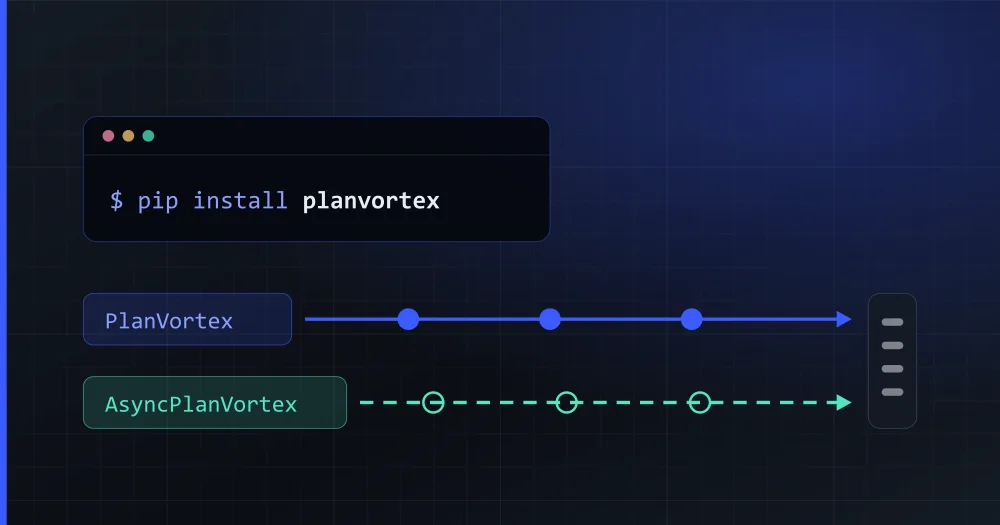
Publishing to every social network from a Python application takes, for each network, an OAuth integration, a video format and its own way of expiring a token. Against a single API it takes a few lines. This guide takes the official PlanVortex library for Python from credentials to a scheduled post, and then covers connecting accounts, comments, webhooks and errors.
pip install planvortex
What does the PlanVortex library do, and what does it not?
It is a server-side client for the PlanVortex API, with one runtime dependency (httpx2) and types generated from the same OpenAPI specification published in the documentation. It needs Python 3.10 or newer, and it comes in two flavours with the same surface: PlanVortex and AsyncPlanVortex.
It covers the whole API: connecting accounts, uploading files, publishing and scheduling, the comment and message inboxes, contacts, products, integrations, AI plans, the metrics dashboard and webhooks.
What it does not do:
| It does not | Why |
|---|---|
| Run in a browser or a notebook you share | Authenticating needs the client_secret, and a secret anyone can read is your account handed over |
| Connect social accounts by itself | Authorizing Instagram is an OAuth flow with a person in front of it |
Retry a POST that reached the server |
With no idempotency key, retrying means duplicating the post |
| Invent each network's limits | The server publishes them and the library reads them from there |
Because of the first row, this package belongs in a Django or FastAPI backend, a serverless function, a Celery task or a cron job, and never in a Streamlit app your users open.
How do you authenticate?
With two environment variables. Your credentials belong to a client app, which you create in the dashboard and which gives you a client_id and a client_secret. The library reads them from the environment so nothing ends up hardcoded in a repository:
export PLANVORTEX_CLIENT_ID=...
export PLANVORTEX_CLIENT_SECRET=...
from planvortex import PlanVortex

pv = PlanVortex()
That is enough. The token is fetched on the first call, cached, and renewed before it expires, so you never touch /oauth/token or write the refresh loop yourself.
Use the context manager and keep a single instance:
# The context manager closes the connection pool when you are done.
with PlanVortex() as pv:
    ...

# And keep ONE instance for the process. A new client per request throws away the cached
# token and the pool, so every request pays for a fresh handshake.
An app sees its own client and that client's organizations, and nothing else: your credentials cannot reach anybody else's data. For the same reason they cannot connect an account either.
How do you publish?
With two calls: the first uploads the file and the second creates the post with the identifier the first one returns.
from datetime import datetime, timedelta, timezone

upload = pv.uploads.create(org_id, "./sourdough.jpg")

publication = pv.publications.create(
    org_id,
    account_id,
    {
        "social_network": "instagram",
        "text": "New oven, new loaves",
        "files": [upload["_id"]],
        "publish_date": datetime.now(timezone.utc) + timedelta(hours=1),
    },
)
A file can be a path, an open binary file, bytes, or a (name, bytes) pair. A path is the only one that does not go through memory: the library opens the file, streams it and closes it, which matters the day somebody uploads a 200 MB video.
publish_date takes a datetime as well as an ISO-8601 string, and it has to carry a timezone. A naive one raises, on purpose: assuming UTC publishes at the wrong time for whoever is in Madrid, and assuming the process's local zone does the same for whoever is in Docker. Neither case raises an error; the post just goes out an hour off.
With no publish_date at all, the post goes out in that same request, and the answer already says whether it did.
What happens if the network will not accept the post?
No exception is raised. The post comes back saved, with a 200, in state withErrors and with the reason inside:
if publication["state"] == "withErrors":
    for failure in publication["publication_errors"]:
        print(failure["code"], failure["message"])
This happens when the network will not take the content (a text over the limit, a YouTube video with no title, a vertical image where the network wants a square). Your request was fine; the content is what failed.
So a try/except around create() catches nothing, and the post sits there never going out while your logs stay clean. Check the state after every create().
publication_errors[].code is a PlanVortex catalogue code, never an HTTP status.
What changes between the sync and the async client?
Three things and no more: the class, an await, and aiterate where the sync one says iterate.
from planvortex import AsyncPlanVortex

async with AsyncPlanVortex() as pv:
    page = await pv.accounts.list(org_id, limit=50)
    async for publication in pv.publications.aiterate(org_id, state=["ready"]):
        ...
The synchronous client is generated from the asynchronous one; CI regenerates it on every push and fails if the committed one differs. It is not a wrapper around asyncio.run(), which is the obvious shortcut and is broken: it raises the moment it is called from inside a running event loop, such as FastAPI's or a notebook's.
Listings give you a page, and there is an iterator for when you want them all:
page = pv.accounts.list(org_id, limit=50)
page.data, page.total

for publication in pv.publications.iterate(org_id, state=["ready"]):
    ...
The iterator has a hard page cap, so a server that ignored offset fails instead of spinning forever.
How do you connect your users' accounts?
Your server mints a token and hands the person a URL. This is the one flow the library cannot finish on its own, and no tool can: it ends with a person pressing "allow" on Instagram's page. Trying it with app credentials answers error 519.
connection = pv.organizations.create_connect_token(org_id)
# connection["url"] is where you send the person. Your client_secret never leaves your server.

person = pv.as_temporal_token(connection["token"])
for link in person.accounts.connect_links(org_id):
    ...
The token lasts fifteen minutes, is single-use, is tied to one organization and cannot issue another one, so saving it for "next time" does not work. Issue a fresh one per connection: they are free and instant.
Branch on link["authorization"]["type"], never on the link itself. WhatsApp's link is the empty string, because its sign-up is Meta's Embedded Signup popup rather than an OAuth redirect, and code that walks the list redirecting to link sends that user straight back to your own page without any error.
When the person comes back, accounts arrive disabled: they take no plan slot and publish nothing until you enable each one. And a single authorization can leave several (a Facebook user with four pages is four accounts), which is why there is a choosing step in the middle.
How do you read comments without spending credits?
With the inbox, which comes out of PlanVortex's database. The thread, on the other hand, asks the network at that moment:
# The INBOX. Comes out of PlanVortex's database: free, fast, and a photograph of the last time
# the network was read.
for comment in pv.comments.iterate(org_id, unread=True):
    print(comment["text"])

# The THREAD. Asks the network right now, and on X that costs one credit per comment returned.
thread = pv.comments.thread(org_id, publication_id)
thread["credits_consumed"]
If you paint a list with the thread, every X comment it returns costs you a credit. Use the inbox for the list and the thread for the conversation you have opened.
It shows on X because its API charges per call, not a flat fee per connected account.
Before painting a button, ask what the network allows. It does not follow from "this network has comments": Instagram, X and Bluesky do not let you delete somebody else's, and LinkedIn has no "hide".
if (pv.comments.actions_for("linkedin") or {}).get("hide"):
    ...
How do you receive webhooks?
By reading the raw request body, because the signature is computed over those bytes. PlanVortex POSTs to your app when an account changes state, a message or a comment comes in, or an integration stops working.
The body is an array of changes, not an object. And if your framework already parsed the JSON and you serialise it again, one extra space or one reordered key changes the signature and verification fails forever: request.json will not do.
The line that gives you the raw body is the only line that differs between frameworks:
# Flask
@app.post("/webhooks/planvortex")
def planvortex_webhook():
    changes = handle_webhook_request(
        body=request.get_data(),  # raw! never request.json
        headers=request.headers,
        secret=os.environ["PLANVORTEX_CLIENT_SECRET"],
    )
    for change in changes:
        if is_comment_change(change):
            moderate(change.get("commentObj"))
    return "", 200
In FastAPI it is await request.body(), and in Django request.body plus a @csrf_exempt, because PlanVortex does not carry anybody's CSRF token.
Narrow with the predicates (is_account_state_change, is_message_change, is_comment_change, is_integration_error_change) and let anything else fall through. The event list grows, and a field this release has never heard of is not an error: a receiver that crashes on an unknown event crashes in production on a Tuesday.
Two more things. Meta repeats deliveries, so deduplicate on commentObj["external_id"] before you act. And PlanVortex does not retry a failed delivery: a 500 of yours loses that event, so answer first, queue the slow work, and use pv.comments.list to catch up on whatever you missed.
How do you handle errors?
By code, never by status. Every domain error in this API travels with a 400 and the real code is in the body. The library turns each range into its own exception so you can catch a family without memorising numbers:
from planvortex import PlanLimitError, PlanVortexError

try:
    ...
except PlanLimitError:
    ...  # 1300-1307 and 1400-1408. Retrying does not fix this; changing plan does.
except PlanVortexError as error:
    error.code, error.family, error.message, error.data, error.status
AuthError, AccountError, FileError, PublicationError, OrganizationError, MessagingError, ContactError, ProductError, AiPlanError, IntegrationError and PlanLimitError cover the catalogue; anything outside it arrives as the base class with its family filled in. Two more are not the API's answer at all: PlanVortexConnectionError (it never got there; already retried, on the methods where retrying is safe) and PlanVortexConfigError (something is wrong on your side, like a missing client_secret).
That is why if error.status == 401: refresh() never fires: the token errors are 501 and 522 inside a 400.
Where to go next?
The package ships five runnable examples, each one the whole of its path: publishing, the calendar, the comment inbox, a webhook receiver with no dependencies, and the connection flow. The comment one only reads unless you set PLANVORTEX_ALLOW_REPLY=1, because replying is public, immediate, and reaches a person.
- The library's reference
- The API documentation, and the OpenAPI document if you would rather generate your own client
- Creating an app
- The same guide for Node.js
What do I need to use the PlanVortex API from Python?
An app created in your client dashboard, which gives you a client_id and a client_secret, and the planvortex package installed with pip. Apps are on all four plans, the free one included. The library needs Python 3.10 or newer and has a single runtime dependency, httpx2 (a different package from httpx classic, so it will not collide with whatever your project already has).
Does the PlanVortex Python library work with asyncio, or only synchronously?
Both, with the same surface. PlanVortex is the synchronous client and AsyncPlanVortex the asynchronous one, and the only differences in your code are the class name, an await in front of each call, and aiterate instead of iterate when you chain pages. The synchronous client is generated from the asynchronous one, so they cannot drift apart: it is not a wrapper that runs an event loop, which would break inside FastAPI or a notebook.
Can I use the PlanVortex library in Django or FastAPI?
Yes, because it is a server-side client. In FastAPI use AsyncPlanVortex and keep one instance for the whole process, because a new one per request throws away the token cache and the connection pool. In Django, the synchronous one. For receiving webhooks, handle_webhook_request takes the raw body and the headers your framework already has, and there is one line of difference between Flask, FastAPI and Django.
Why does the PlanVortex API answer HTTP 400 on every error?
Because the real code travels in the body, in the code field, and the status is only the envelope. An expired token, a disconnected account, an exhausted plan quota and a text that is too long all arrive as a 400. The library turns each range into its own exception (AuthError, PublicationError, PlanLimitError), so you catch a family without memorising numbers. What you should not do is classify by status.
Are the library's types real, or does everything come back as a dict?
They are real and they are checked: the shapes are TypedDict generated from the same OpenAPI specification the API publishes, the package ships py.typed, and mypy --strict runs over the whole thing including the examples. They are TypedDict and not pydantic models for one concrete reason: the primary key of every PlanVortex resource is called _id, and pydantic cannot have a field whose name starts with an underscore. So it stays publication["_id"], exactly as the documentation says.