
LinkedIn MCP server: post from Claude through the official API
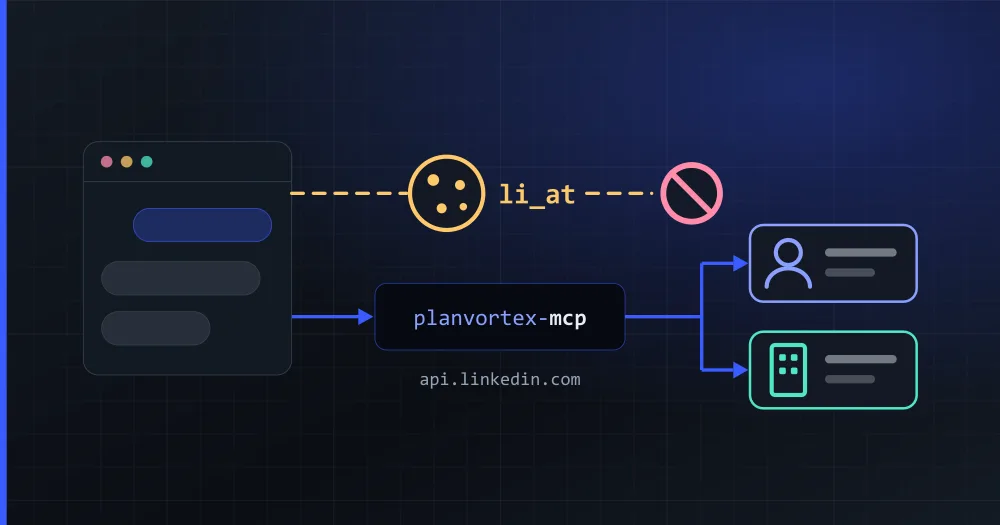
LinkedIn has no MCP server of its own, and most of the ones on GitHub work by driving your logged-in session, which LinkedIn's User Agreement forbids. The PlanVortex MCP server goes through LinkedIn's official API instead. From Claude, Cursor, VS Code or any other MCP client, it posts to your personal profile and to the company pages you manage, schedules posts and answers the comments on your pages.
npx -y planvortex-mcp
Is there an official LinkedIn MCP server?
No. LinkedIn publishes APIs, and every "LinkedIn MCP" you find is a third-party project. They reach LinkedIn in one of two ways, and that decides what they can do and what you put at risk:
| How it reaches LinkedIn | What it can do | What you risk |
|---|---|---|
Your session: the li_at cookie copied from your browser, or a headless browser logged in as you |
Anything you can do by hand: read profiles, search people and jobs, send messages, post | Your account. LinkedIn's terms forbid it, and the cookie gives whoever holds it the same access you have |
| The official API, after you authorize the app on LinkedIn's own screen | Post to your profile and your pages, read and answer comments on your pages, read post statistics | Only the permissions you granted, which you can revoke from your LinkedIn settings |
Searching people and reading other members' profiles are not in the official API at all. The servers that offer them work through your session.
What does LinkedIn's User Agreement say about it?
Section 8.2 of the User Agreement, in force since November 3, 2025, lists what members agree not to do. Two of the items describe a session-based MCP server closely:
Develop, support or use software, devices, scripts, robots or any other means or processes (such as crawlers, browser plugins and add-ons or any other technology) to scrape or copy the Services, including profiles and other data from the Services
Use bots or other unauthorized automated methods to access the Services, add or download contacts, send or redirect messages, create, comment on, like, share, or re-share posts, or otherwise drive inauthentic engagement
And section 3.4 says what follows: "LinkedIn reserves the right to restrict, suspend, or terminate your account if you breach this Contract or the law or are misusing the Services." The account at stake is the one whose cookie the server uses, which is yours.
An app you authorize through LinkedIn's OAuth screen is the route LinkedIn built for this: you see the permissions before you accept them, and the post goes out through the API that LinkedIn documents and versions.
What can you do on LinkedIn from Claude with PlanVortex?
- Post to your profile or to your pages: text up to 3,000 characters, up to nine images, or a video, either now or scheduled. The server checks those limits before it calls anything, and it escapes the text for LinkedIn's format, so a bracket in the copy does not cut the post short. (The LinkedIn API guide explains why that happens.)
- Read the comments on your pages, open a thread, reply and mark it as read. A personal profile has no comment inbox: LinkedIn does not let any app read the comments on a member's posts.
- Read the statistics of each post, on profiles and on pages.
A conversation looks like this:
You: Write a LinkedIn post about our new pricing page. Put it on my profile and on the company page, Tuesday at nine.
The assistant: (uses
list_accounts, thencreate_publication) Scheduled for Tuesday at 9:00 on your profile and on the company page. This is the text: …You: Any comments on last week's post on the page?
The assistant: (uses
list_comments) Four. One of them asks whether the API has a daily limit.
list_accounts marks which account is your personal profile (personal_profile) and which are pages, so the model knows what "my profile" means without guessing.
How do you connect your LinkedIn profile and pages?
With a single authorization. You sign in on LinkedIn's own screen, that consent covers your personal profile and every page you administer, and then you choose which of them to add. Each one counts as an account of your plan. The free plan has three.
From the assistant, create_connect_link returns a single-use link that expires in fifteen minutes. You open it, authorize, and the accounts appear without your client_secret leaving your machine. You can also connect them from the dashboard, on the Accounts page.
You do not need a LinkedIn developer app of your own. Posting to company pages requires LinkedIn's Community Management API, which LinkedIn grants after reviewing the app. PlanVortex's app has it at the Standard tier, so you fill in no access form and inherit no cap of 500 calls a day. The token lasts 60 days and renews by itself. Once a year LinkedIn asks the person to authorize again.
How do you set it up?
You need a PlanVortex app, created in the dashboard under Settings → Apps, which gives you a client_id and a client_secret. You also need Node 20 or newer. Apps are on every plan, the free one included.
In Claude Code it is one command:
claude mcp add planvortex \
  --env PLANVORTEX_CLIENT_ID=... \
  --env PLANVORTEX_CLIENT_SECRET=... \
  -- npx -y planvortex-mcp
In Claude Desktop, Cursor or VS Code, the same values go in the client's MCP configuration file. The MCP server guide has the JSON for each client, a bundle for Claude Desktop that installs without Node, and how to let the server upload images from your disk.
What does it leave out?
It deletes nothing. No tool removes a post, a comment or an account, because the model reads comments written by strangers while it holds tools that publish under your name. The MCP server guide explains that decision and the other defenses against prompt injection.
It also stays inside the official API, so it has no people search, no reading of other members' profiles and no connection requests.
If you would rather not set anything up, the dashboard posts to the same profile and pages without code. On paid plans, its AI planner also writes the week's posts, with images or from your own photos.
Where do you go from here?
- The MCP server guide: setup in every client, the full list of tools and the security limits.
- LinkedIn API pricing and access: the access tiers, the 426 error and why posts get cut off.
- The developers page and the plans.
Is there an official LinkedIn MCP server?
No. LinkedIn publishes APIs but no MCP server, so every LinkedIn MCP server is a third-party project. Some drive your logged-in session, with the li_at cookie or a headless browser. Others call LinkedIn's official API after you authorize them on LinkedIn's own screen. The PlanVortex one is in the second group.
Is it against LinkedIn's terms to use an MCP server with my li_at cookie?
Section 8.2 of LinkedIn's User Agreement forbids using bots or other unauthorized automated methods to access the service or to create, comment on, like or share posts, and forbids software that scrapes or copies profiles. Section 3.4 lets LinkedIn restrict, suspend or terminate an account that breaches the agreement. An app you authorize on LinkedIn's OAuth screen works through the official API, which is the route LinkedIn provides for this.
Can an MCP server post to a LinkedIn company page?
Yes, if it goes through LinkedIn's Community Management API, which LinkedIn grants only after reviewing the app. PlanVortex's app has it at the Standard tier, so you connect your pages with one authorization and post to them from Claude, Cursor or any MCP client without applying for anything yourself.
Can it read the comments on my LinkedIn posts?
On company pages, yes: it lists them, opens the thread and replies. A personal profile has no comment inbox, because LinkedIn does not let any app read the comments on a member's posts.
How much does it cost?
The MCP server costs nothing to install. It needs a PlanVortex app, and apps are on every plan: the free plan includes one app and three connected accounts, enough for your profile and two pages. The AI planner, which writes a week of posts, is on the paid plans.