
How to switch Instagram to a professional account to connect it to PlanVortex
To connect Instagram to PlanVortex, the account has to be a professional account, and either type works: business or creator. Meta requires it, because its API only gives access to professional accounts. You can switch from the app or from instagram.com, the change can be undone, and you do not need a Facebook Page.
Which Instagram account do I need to connect it to PlanVortex?
An Instagram professional account. Instagram has two types of professional account, business and creator, and PlanVortex connects both. A personal account cannot be connected.
| Account type | Can it connect to PlanVortex? |
|---|---|
| Personal | No |
| Professional, creator | Yes |
| Professional, business | Yes |
You do not need to link it to a Facebook Page. For what PlanVortex does with Instagram (publishing, replying to comments and direct messages, and reading insights), business and creator accounts work the same: Meta's documentation does not reserve any of those features for one of the two types.
Why does Instagram require a professional account?
Because it is the only kind that has API access. Meta's documentation puts it plainly: to use its APIs, an app's users must have an Instagram professional account. The API meant for consumer apps, the Instagram Basic Display API, stopped working on December 4, 2024, and the two APIs Meta pointed to instead only work with professional accounts.
Of those two, PlanVortex uses the Instagram API with Instagram Login. With it you authorize the connection on Instagram's screen, without going through Facebook, and the account does not need a linked Page. The other one, which uses Facebook Login, does require the professional account to be connected to a Page.
How do I know if my Instagram account is already professional?
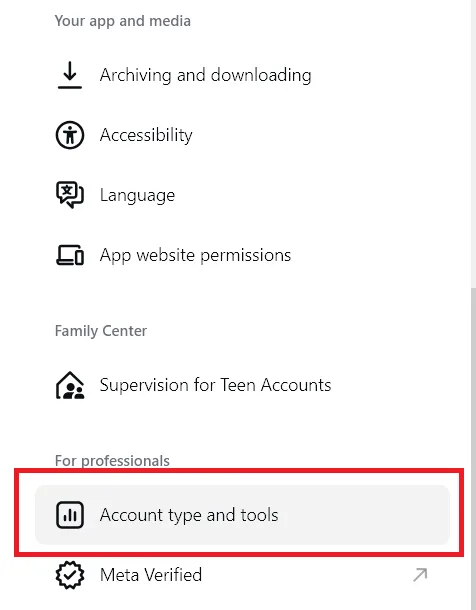
In the app, go to your profile, tap More (top right) and, under For professionals, tap Account type and tools.
- If it offers Switch to professional account, your account is personal.
- If it lets you open Account type to switch between business and creator, it is already professional and you can connect it.
There is a quicker clue: a professional account cannot be private. If your profile is set to private, it is a personal account.
How to switch your Instagram account to professional, step by step
From the Instagram app, as the Instagram Help Center describes it:
- Tap Profile or your profile picture in the bottom right.
- Tap More, at the top right, to go to Settings and activity.
- Under For professionals, tap Account type and tools.
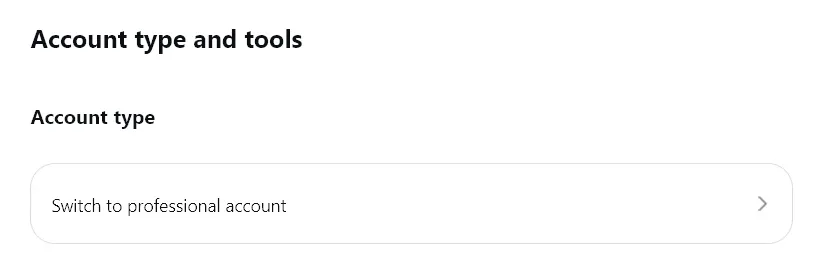
- Tap Switch to professional account.
- Choose the category that best describes what you do. The category does not decide whether the account will be business or creator.
- Tap Switch to professional account, choose Creator or Business and tap Next.
- The steps after that are optional. You can skip the contact details with Don't use my contact info, and the Facebook Page with Skip.
From instagram.com, on a computer:
Click More, then Settings.
Under For professionals, select Account type and tools.
Screenshot from October 23, 2026 Click Switch to professional account, choose Creator or Business and click Next.
Screenshot from October 23, 2026 Choose a category and click Done. Instagram asks you to confirm with Continue.
Once the account is professional, go back to PlanVortex and connect it from Accounts, in Connect.
What changes in my account when I make it professional?
A professional account cannot be private. If yours was, it becomes public and pending follow requests are accepted automatically. The category you chose also appears below your profile picture, although you can hide it.
In return, Instagram gives you insights for the account and for each post, a contact button on your profile and the option to run ads. Those are the same insights PlanVortex reads to show them next to your other accounts.
You can switch back to a personal account whenever you want. If you do, any linked Facebook Page is disconnected and the account stops working with PlanVortex.
What happens if I try to connect a personal account?
It does not connect, because Meta does not give personal accounts API access. If the authorization finishes without any professional account, PlanVortex tells you when you come back, with the message "It seems we couldn't find any Meta accounts", and links you to this guide. Switch the account to professional and connect it again from the start.
Sources
- Instagram Platform: overview, Meta for Developers. Checked on October 22, 2026.
- Instagram API with Instagram Login, Meta for Developers. Checked on October 22, 2026.
- Update on Instagram Basic Display API, Meta for Developers blog, September 4, 2024.
- Set up a professional account on Instagram, Instagram Help Center. Checked on October 22, 2026.
- About professional accounts on Instagram, Instagram Help Center. Checked on October 22, 2026.
- Switch back to a personal account on Instagram, Instagram Help Center. Checked on October 22, 2026.
Do I need to link a Facebook Page to connect Instagram to PlanVortex?
No. PlanVortex uses the Instagram API with Instagram Login, and according to Meta's documentation that API does not need a Facebook Page linked to the professional account. You authorize the connection on Instagram's own screen. Linking a Page is optional: Instagram offers it while you switch the account to professional, and you can skip that step with Skip.
Business or creator account: which one should I choose?
For connecting it to PlanVortex it makes no difference. Both are professional accounts, and Meta's documentation does not limit anything PlanVortex does to one of the two types: publishing, replying to comments and direct messages, and reading insights. Instagram recommends business accounts for retailers, local businesses, brands and organizations, and creator accounts for public figures, artists and content creators. You can switch between them at any time.
Does my account become public when I switch it to professional?
Yes. A professional Instagram account cannot be private: if yours was, it becomes public when you switch, and any pending follow requests are accepted automatically. If that account has to stay private, create a separate one for the brand and connect that one to PlanVortex.
Can I switch back to a personal account later?
Yes, at any time: in Account type and tools, tap Account type, then Switch account type and Switch to personal account. You lose access to tools such as Meta Business Suite and Meta Ads Manager, and any Facebook Page linked to the account is disconnected. The account also stops working with PlanVortex, because the Instagram API only works with professional accounts.